
A-Dub Dining: Daily Menus at Your Fingertips
Overview
A-Dub Dining is a desktop application designed to simplify meal planning and dining decisions for users seeking convenience and structure in their daily routines. The software provides access to comprehensive daily menus for breakfast, lunch, and dinner, with content available up to two weeks in advance. This feature helps users eliminate uncertainty around meal options, particularly in environments where menus change frequently or are not easily accessible.
Targeted primarily at individuals who value organization and time efficiency, A-Dub Dining serves as a digital companion for daily dining choices. It is suitable for home users, office professionals, and anyone managing a busy schedule who wants to make informed decisions without last-minute stress. The app’s focus on accessibility and intuitive design supports users in quickly identifying meal options, including salad selections, and staying updated on seasonal offerings.
The developer did not provide additional details about the company or development background. Real-world usage scenarios include planning meals for the week, avoiding meal fatigue through variety, and ensuring timely access to special menu items. Notifications are integrated to alert users about new menu additions, helping maintain engagement with dynamic dining content.
Key Features & Capabilities
- Advance Menu Access – View full daily menus for breakfast, lunch, and dinner up to two weeks ahead, enabling proactive meal planning.
- Salad Option Discovery – Easily browse and identify salad choices across different meal times, supporting healthy eating habits.
- Seasonal Specials Alerts – Receive timely notifications when new seasonal dishes are added, helping users stay informed about limited-time offerings.
- User-Friendly Interface – Designed for intuitive navigation, allowing users to locate menus and options with minimal effort.
- Menu Scheduling Integration – Supports users in organizing their meal choices in advance, reducing daily decision fatigue.
These features are particularly useful for individuals managing dietary preferences, meal routines, or shared dining schedules. For example, a user can plan meals for the week during a quiet morning, ensuring they are prepared for upcoming dining options. The notification system helps prevent missed opportunities for seasonal dishes, enhancing the overall dining experience. The interface supports quick access, minimizing time spent searching for specific items.
User Interface, Workflow & Performance
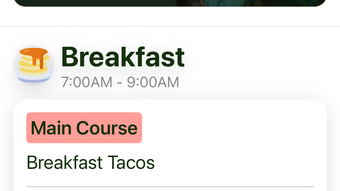
The user interface of A-Dub Dining is structured around simplicity and direct access to core functions. Navigation is streamlined, with menus and options presented in a clear, organized layout. Users can quickly switch between meal times and view detailed information without unnecessary steps.
Workflow efficiency is enhanced by the app’s focus on accessibility and minimal interaction requirements. Users can browse daily menus, select preferred meals, and receive alerts with a few clicks. The app’s design prioritizes usability, especially for users who may not be tech-savvy or prefer low-effort digital tools.
Performance observations are based on general software behavior patterns. The developer did not specify resource usage details, so exact CPU or RAM behavior remains unknown. Stability is expected to be consistent with standard desktop applications, though real-world testing data was not provided. The app operates within a 128 MB installation size, suggesting a lightweight footprint, though performance under heavy multitasking conditions was not evaluated.
Compatibility & System Requirements
A-Dub Dining is compatible with both Windows and Mac operating systems, offering broad accessibility across desktop platforms. The software version is 1.0, indicating a stable initial release. The installation size is 128 MB, which is relatively compact for a desktop application.
Exact system requirements were not listed. This includes hardware specifications such as processor speed, RAM, or disk space beyond the installed file size. Compatibility information was partially provided, leaving users without definitive guidance on minimum or recommended configurations. The developer did not specify whether the app supports older OS versions or requires specific system updates.
Pros and Cons
Pros
- Provides advance access to daily menus up to two weeks in advance
- Intuitive interface designed for easy navigation and quick access
- Includes timely notifications for seasonal specials and new menu items
- Lightweight installation at 128 MB
- Free to download and use with no cost barrier
Cons
- No detailed system requirements were provided
- Exact performance metrics, such as CPU or RAM usage, were not specified
- Limited information on developer background or support channels
- Compatibility with older OS versions is unclear
- No indication of update frequency or future feature roadmap
FAQ Section
Is A-Dub Dining available for both Windows and Mac?
Yes, A-Dub Dining is compatible with both Windows and Mac operating systems, allowing users across desktop platforms to access its features.
Is the software free to use?
Yes, A-Dub Dining is currently available at no cost. There are no subscription fees or in-app purchases required for basic functionality.
Can I use A-Dub Dining offline?
The app’s offline capabilities were not specified. While some features may function without an internet connection, real-time notifications and menu updates likely require an active connection.
How often are menus updated?
Menus are updated on a daily basis, with content available up to two weeks in advance. Users can access new offerings as they become available.
Does A-Dub Dining require an internet connection?
While the app may store some data locally, access to the latest menus and notifications depends on an active internet connection. Offline use is limited to cached content.
Final Thoughts + CTA
A-Dub Dining stands out as a practical, user-focused tool for anyone seeking to streamline their dining decisions. Its ability to provide advance access to daily menus, combined with timely alerts for seasonal specials, makes it a valuable addition to daily routines. The intuitive interface and lightweight design ensure accessibility for a wide range of users, from busy professionals to health-conscious individuals managing meal plans.
While the lack of detailed system requirements and performance data limits deeper evaluation, the app delivers on its core promise: simplifying meal planning with clarity and ease. For users who value convenience and structure in their dining choices, A-Dub Dining offers a compelling solution without cost.
Download A-Dub Dining now







